

Quick answerA Crazy Time app download means installing the casino app: 1win carries the same live Evolution table on its website and in its app. Your login and balance work in both.
Just need the installation steps? Go straight to the Android APK or iPhone setup.
Android, iPhone and PC: which version to install
The installation depends on your device. Android uses an APK from the 1win site. iPhone and iPad use a home screen icon added through Safari. On macOS and Windows, 1win runs as a web app in its own window.
| Platform | Installation | What to expect |
|---|---|---|
| Android | Download the APK using Install on the 1win site | Allow installation from unknown sources; 1win is not in Google Play |
| iPhone and iPad | Safari → Share → Add to Home Screen → Add | A home screen icon; 1win is not in the App Store |
| macOS | Select 1win for macOS in the menu or Install in the footer | A Dock icon opens 1win in its own window |
| Windows | Install the web app through your browser | A separate window that you can pin to the taskbar |
How to download 1win on Android: APK steps
For the Crazy Time APK download, use the 1win site's App section or Install button. Download the file, allow installation and open the APK. The app requires Android 8.0 or newer.
- 1
Website
Open 1win in your browser
Open 1win.com or 1win.pro and scroll to the footer. Find the app installation card for Android and iOS. If you are viewing it on a computer, use the QR code to open the download on your phone.

1win homepage footer: 200 1win Points for installing the app on Android and iOS, plus the macOS app. - 2
Download
Download the APK from the site
Tap Install and download the file. The 1win app is not available in Google Play.
- 3
Permission
Allow installation from unknown sources
Enable the installation permission in Android settings for the browser downloading the file. The wording varies between phone manufacturers.
- 4
Installation
Open the downloaded file
Launch the APK, confirm the installation and open 1win using its app icon.
- 5
Account
Log in and open Crazy Time
Use your existing 1win website account. Find the table in the Live casino section.
My advice is to take the file directly from 1win.com or 1win.pro. A familiar icon on a forum or APK catalogue does not establish who supplied the file.
1win on iPhone: Safari to your home screen
On iPhone, add 1win to your home screen through Safari. It is not in the App Store. The resulting icon sits alongside your other apps; the same steps work on iPad.
- Open the site in Safari. Visit the 1win site and tap Share in the browser.
- Choose Add to Home Screen. Tap Add to place the icon on your home screen.
- Open 1win using the icon. Log in with your website account. There is no App Store file to download.
1win on PC: macOS and Windows
1win also runs as a web app on a computer. On Mac, select 1win for macOS in the menu or Install in the footer. In Safari, use Share → Add to Dock → Add. The Dock icon opens 1win in a separate window without the usual browser panels. On Windows, install it through your browser and pin the app window to the taskbar. You can also open Crazy Time directly on the website.
Where to install 1win
The Android APK and Safari installation steps above are shared. Use your existing login, or register with a phone number and e-mail. The app and website share your account balance and welcome package on the first deposits.
Bangladesh: BDT account
For a Crazy Time app download in Bangladesh, use the same 1win APK on Android or Safari steps on iPhone. The account currency is BDT. Welcome package on the first deposits.
Deposit methods after installation: bKash, Nagad — from ৳200; Upay — from ৳300.
Open 1winIndia: INR account
Choose INR when registering. Welcome package: Up to 500% on the first four deposits; minimum deposit ₹300, wagering ×30.
Deposit methods after installation: UPI, PhonePe, Paytm, GPay — from ₹300.
Open 1win1win app installation bonus
Installing 1win on Android or iPhone earns a one-time reward in 1win Points. It appears in Free Money in your account and belongs to the platform's loyalty programme.
 1winAndroid and iOS
The installation reward is separate from the deposit welcome package. Live casino bets, including Crazy Time bets, do not earn Points. The app's practical benefit is quick access from your device's home screen.
Where to find Crazy Time in the 1win app
Open Live casino, select the game shows row and choose Crazy Time. Look for the CRAZY TIME artwork and Evolution name.
- Open Live casino. Select the section from the 1win menu.
- Choose Game shows. Find the Crazy Time card.
- Open the Evolution table. You need a login and balance: Crazy Time is played for real money and has no demo mode.
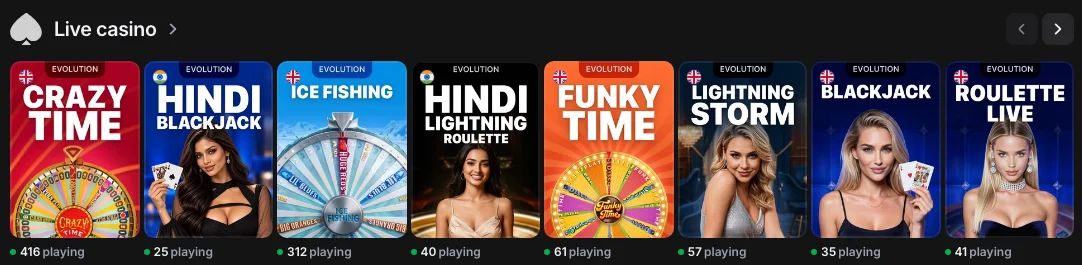
The cashier and balance are shared with the website. For registration with a phone number and e-mail and more account details, see Crazy Time at 1win.
The 1win app and signs of a fake download
The 1win APK comes from 1win.com or 1win.pro. Start with the website address rather than a logo on a download page. The 1win account page explains registration and login.
The 1win app
- An APK downloaded directly from the 1win site.
- An Android file or an iPhone home screen icon added through Safari.
- The same 1win login used on the website.
- Crazy Time streamed live from the Evolution studio.
Warning signs
- A file supplied by a forum or third-party APK catalogue.
- A standalone “Crazy Time APK” presented as an Evolution product, with an automated wheel instead of a live broadcast.
- “Predictor”, “signals” or “hack” in the name, or a login form outside 1win.
- A claimed 1win download in Google Play or the App Store, where the app is unavailable.
Crazy Time signals cannot predict the wheel's result. Country restrictions and account rules are covered in the restrictions for players.
Author's view: app or browser
If you open 1win on your phone every day, the app icon gives you quicker access. The Crazy Time table, bets and odds remain the same as in the browser.

My choice depends on the device: the site's APK on Android, the Safari icon on iPhone. On a computer, the browser is enough for the same table; the macOS web app is useful if you prefer keeping 1win in its own window.
The app changes the way in, not the game: the same Evolution table, the same balance, and real-money play from the first spin.
Yuriy Gurskiy ·
I recommend opening the site directly in Safari on iPhone. If a link opened inside another app's browser, switch to Safari before using Add to Home Screen.
Dasha Sarkisian, editor ·Restrictions for players
- Online money games are prohibited in India under PROGA (in force since 1 May 2026).
- Online gambling in Bangladesh is restricted under the Gambling Prevention Act, 2026 (in force since 1 July 2026); there is no licensing regime for online casinos.
- VPN is not allowed under 1win rules; a breach can lead to a blocked account and a cancelled win.
- 18+. Play only with money you can afford to lose. Set a spending limit before playing.
- Mental health support in India: Tele-MANAS, Ministry of Health and Family Welfare.
Questions about the Crazy Time app download
Is there a Crazy Time app?
There is no standalone Crazy Time app. The Evolution table runs inside the 1win app and on its website, using the same login and balance.
How do I download the Crazy Time APK?
Open the official 1win site and use the App section or Install button. Download the APK, allow installation from unknown sources and open the file. Use the site's file rather than a third-party APK download.
Can I download Crazy Time on iPhone?
You can open the table through 1win on iPhone. 1win is not in the App Store: open its site in Safari, then choose Share → Add to Home Screen → Add.
Does the 1win app work on PC?
Yes. 1win runs as a web app on Windows and macOS. You can also play directly in your browser.
Is there a bonus for installing the app?
Yes, a one-time 1win Points reward for installing on Android or iOS. It appears in Free Money in your account; the installation bonus section above shows the reward.
Is the Crazy Time APK from Softonic safe?
For the 1win table, use only the file from the official 1win site. A familiar icon on a download page does not identify the file's source, and there is no standalone Evolution Crazy Time app.
Which Android version do I need?
Android 8.0 or newer.
Where is Crazy Time inside the app?
Open Live casino, go to the game shows row and select Crazy Time by Evolution. The table requires a login and a real-money balance.
Betting and casino writer covering Crazy Time: game reviews, strategies, casinos and app installation.
- English version: Crazy Time details for players in Bangladesh and India, with country tabs.
Sources: Crazy Time app download — 1win app page, Free Money and terms
1win's app page and Free Money section describe installation and its reward. Evolution's Crazy Time page describes the game.
| Page topic | Source document |
|---|---|
| Android, iPhone, macOS and Windows installation | 1win app page and installation instructions · 5 November 2026 |
| One-time installation reward | 1win Free Money rewards · 5–6 November 2026 |
| Live casino bets do not earn Points | 1win Points loyalty programme rules |
| Registration and account currencies | 1win registration screen and country account information |
| Welcome packages | 1win India deposit bonus terms and Bangladesh welcome package information |
| Country deposit methods | 1win India and Bangladesh payment information |
| Live casino and game shows | 1win Live casino, English version · 5 November 2026 |
| Real-money play without a demo | Crazy Time table at 1win · 6 November 2026 |
| VPN restriction and minimum age | 1win terms and conditions · 5 November 2026 |
| Country restrictions | Promotion and Regulation of Online Gaming Act, 2025 (India); Gambling Prevention Act, 2026 (Bangladesh) |
| Mental health support in India | Ministry of Health and Family Welfare — Tele-MANAS |
| Evolution table and unpredictable results | Evolution Crazy Time game page · 5 November 2026 |